You may have heard that your Xbox 360 can connect to your Media Center 2005 PC to experience a world of DVR-like goodness: pause live TV, listen to your music remotely, use cool programs, and much more. Windows Media Center coupled with your Xbox 360 presents a vista of potential that sparks the imagination.
Once you face the reality of Media Center though, it’s a god-awful mess, and no one seems to be talking about it. The problems that I’ve had with Media Center really boggle my mind. So, I wanted to talk about it – to open an Internet discussion. If you’re looking at putting your Xbox 360 in the mix with a Media Center PC, you should be aware of just how fickle the Media Center software is, especially when streaming TV or other video.
The Xbox 360 and Media Center: A Series of Disappointments.
—
I’m using the title and subject of this post almost verbatim from the link.
In addition, I’m going to add that so far I’ve had to….
…add a completely new registry key…
…add and remove the software any number of times…
…got way too close to uninstalling a service pack (death to installs)…
…and now I’m manually changing the size of RDP packets in a hope to make two *CORE* Microsoft products work together…
And now I need to restart…again…to hope the change takes hold. And yes, I’m still halfway through the software install that can’t finish when the XBOX crashes…which it has about 10 consecutive times now.
So I had to post this (and keep the links) without knowing if it will *finally* work. This seems to be on the right track, as it’s the kind of bad input that could cause a hard crash (networking hardware is usually very sensitive to crap data…for good reason), but we’ll only know for sure after I kill it all again.
It also makes sense this is an issue caused by .Net 3.0. After working with 1.0, 1.1 and 2.0 and the core problems (changes) they created, I can certainly believe this is the problem here.
Wish me luck.
—
UPDATE: No luck so far. Now I’m going to try rolling back some drivers.
For some reason, I can almost assume as this point the *real* fix for this *problem* is to upgrade to Vista. Let’s see if I can’t get this shit fixed without *that* horrid step (which I’m not taking).
—
UPDATE2: Looks like it was the RDP problem, as detailed here.
This is the registry key you need to add. Start -> Run -> “Regedit”. Then find [HKEY_LOCAL_MACHINE\SYSTEM\CurrentControlSet\Control\Session Manager\Memory Management] and add the D-Word value and then modify it.
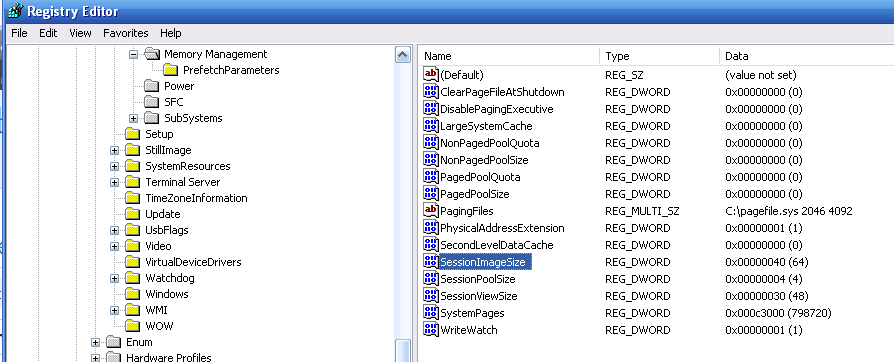
So, that’s ultimately what it took to get working. I had recently added a new hard drive (300gb) to my main machine (XP MCE ’05 SP3) and decided to use about 100gb of the new drive as DVR space. Since my TV has 15″ more diagonal screen space that my PC monitor, it would make sense to route the signal through that viewing device.
 Robot Pirate Ninja